Out now on Google Play

Run the fleet from wherever you are standing.

Every trip that is running, every lorry on one map, and every rupee that moved between you, your drivers and your parties — on the phone in the yard, the tablet in the cab, and the computer in the office. One account, the same books on all three.

Same account as TrukZone Driver · Sign in with your mobile number · No email, no password

📱Android & iPhone 📟iPad & Android tablets 💻Mac & Windows
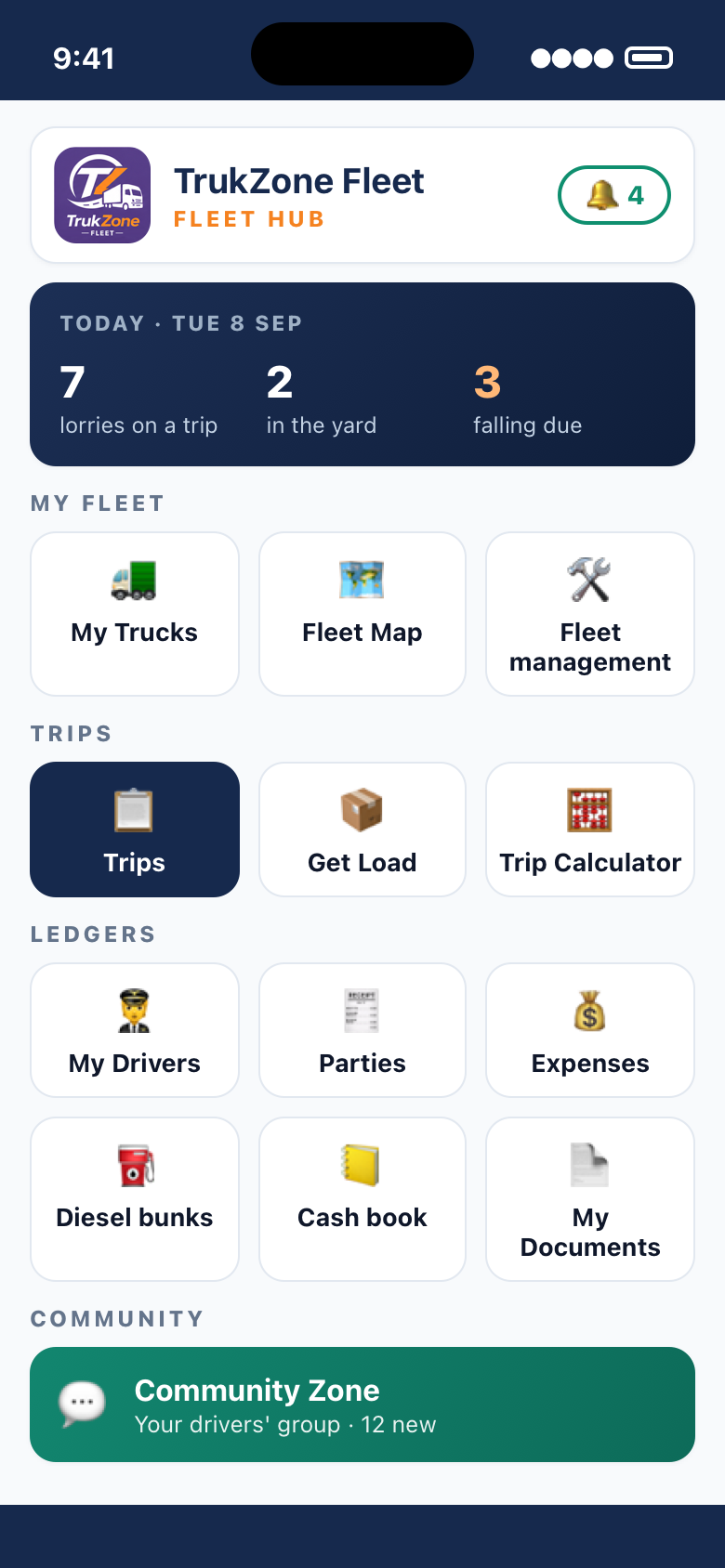
TrukZone Fleet home screen: lorries on a trip, in the yard and falling due, with My Fleet, Trips, Ledgers and Community sections
🙋Murugan asked for ₹5,000Advance, mid-trip · Salem → Guwahati
📍TN 30 CE 7731 unloadedVijayawada · from the driver's phone
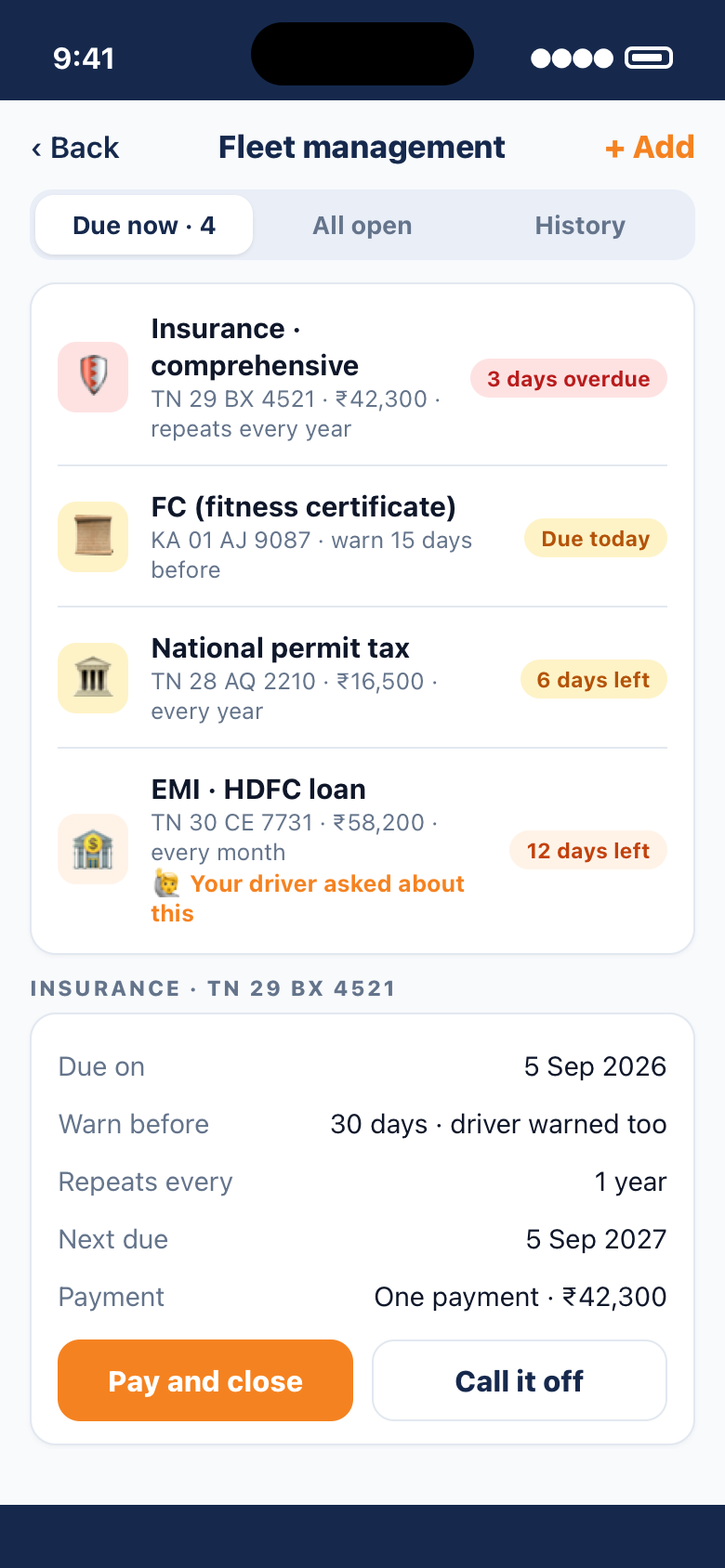
🛡️Insurance due in 6 daysTN 28 AQ 2210 · driver warned too
3screens — phone, tablet and desk — one set of books
1trip screen shared live between you and the driver
9Indian languages, every button and every warning
0days waiting for the lorry to come home before you can settle
Phone · Tablet · Desk

The screen you have in your hand is the right one.

A fleet is not run from one chair. TrukZone Fleet has three faces of the same app — each built for where you are, all reading and writing the same books, so nothing is “only on the computer”.

On the phone

Standing in the yard, one-handed, for thirty seconds.

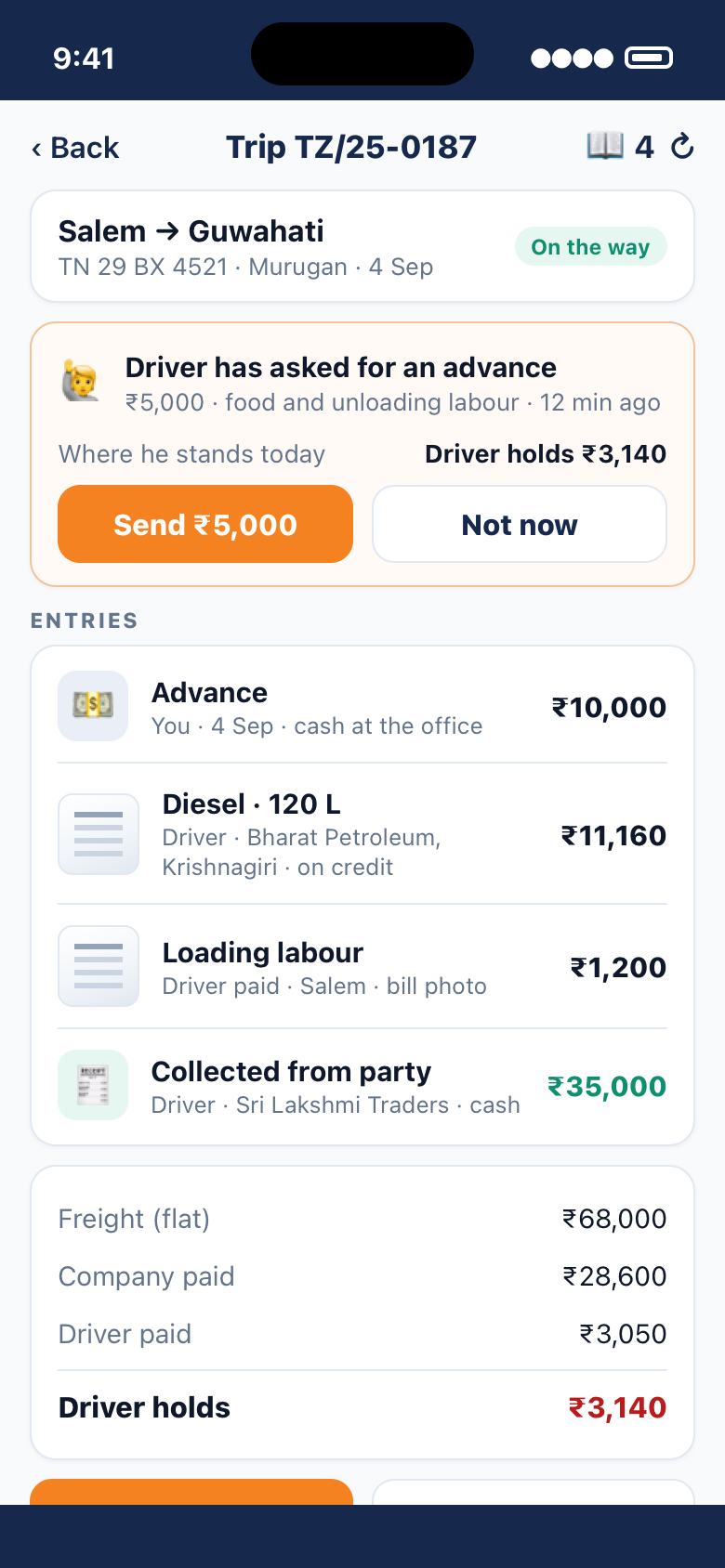
Is that lorry loaded? Did Murugan take diesel? Send the advance he asked for. Look at the map before the party rings. The phone answers the questions that come up in a day and lets you act on them where you are.

  • Every trip, ledger and lorry — opens without waiting for a signal
  • Approve an advance, a driver's figures or a checklist from anywhere
  • Photograph the LR or a party's bill straight onto the trip
  • Print a trip slip or a trip sheet on a Bluetooth roll printer
A live trip on the phone: the driver's advance request at the top, the entries below, and Complete trip / End trip buttons
On the tablet

The list beside the thing it opens — sized for a finger.

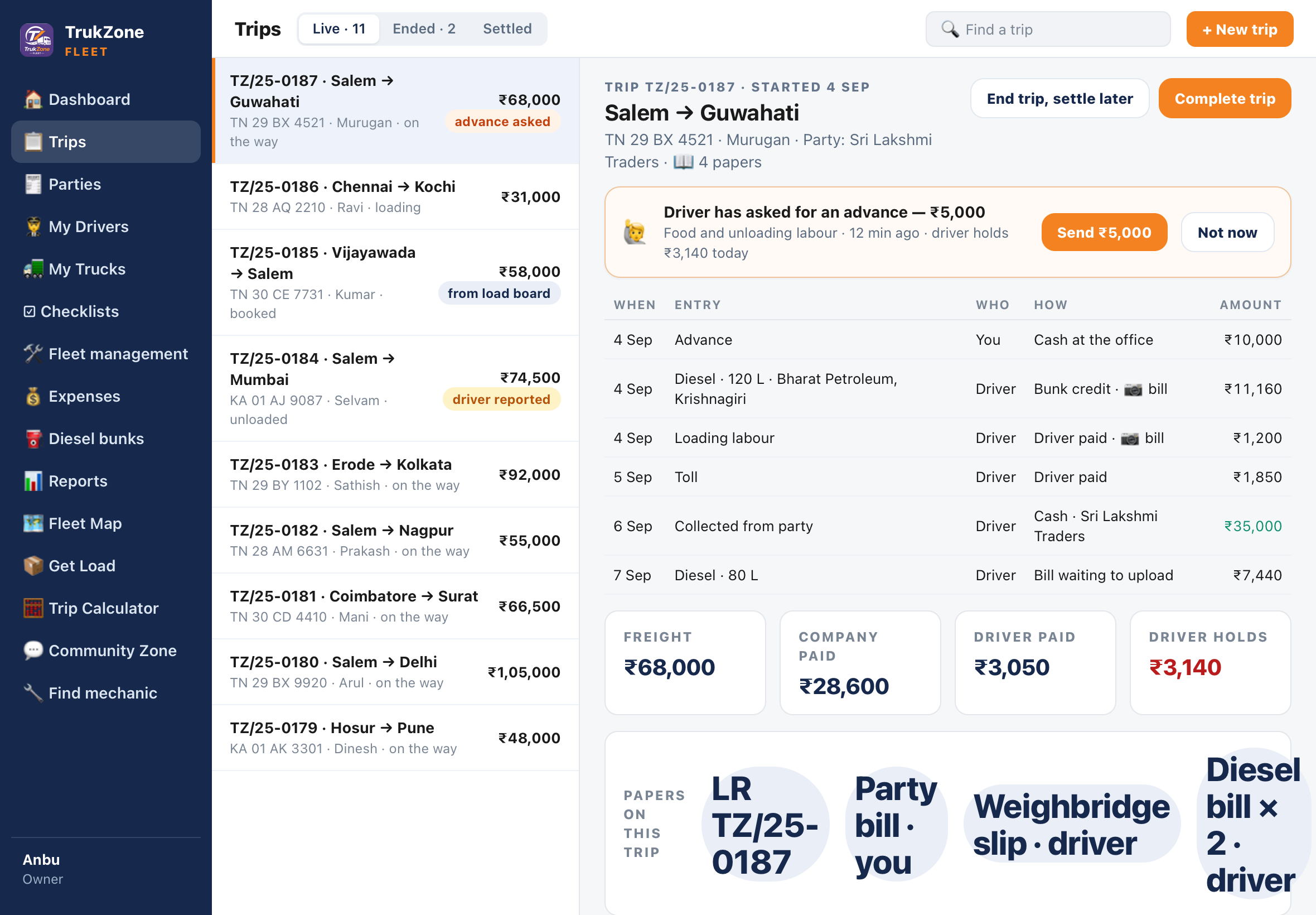
An iPad or an Android tablet gets a wide layout of its own: a rail of places down the side, the trips on the left, the trip you tapped on the right. Made for the owner who runs the fleet from the front seat, the cabin at the loading point, or the sofa.

  • Same app as the phone — it re-sizes itself when it has the room
  • See ten trips and the one you are working on at the same time
  • Rotate, split-screen, or dock a keyboard; the layout follows
The tablet layout: a rail of places, the list of live trips, and the selected trip with its entries and totals
On the desk

Settling a fortnight of trips is desk work. So there is a real desk application.

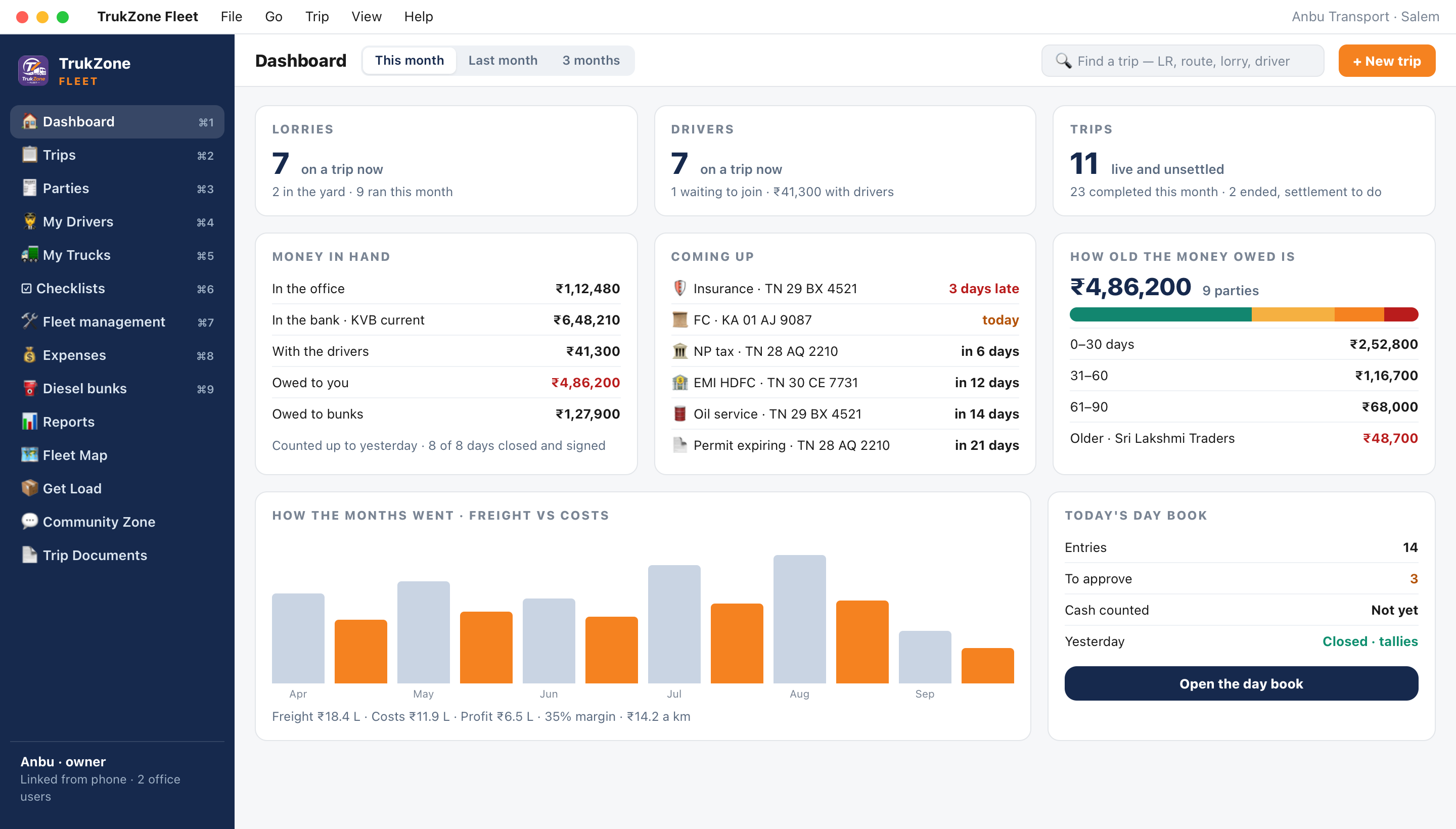
On a Mac or a Windows PC, TrukZone Fleet is a proper desktop program — menu bar, keyboard shortcuts, a dashboard of the whole business, day book, reports and the ledgers with room to breathe. Your office staff sign in with their own user names and see only what you let them.

  • Link the computer from your phone with a code or a QR — no password, nothing by SMS
  • Office users with “see” or “change” rights, screen by screen
  • Day book with approvals, cash counted, and a day that closes and locks
  • Profit, per-lorry, per-driver, per-lane and ageing reports
The desktop dashboard: lorries and drivers on a trip, money in hand, what is coming up on the fleet, how old the money owed is, and the monthly freight against costs
What the owner app does

The whole yard, without the diary.

Built around the questions an owner actually asks in a day — where is the lorry, what has that trip cost so far, did it settle, and who has still not paid.

📋

Live trips, shared with the driver

Raise a trip and it is on the driver's phone before he has left the yard. Every diesel fill, toll and collection he records shows on your screen as it happens — one trip, one set of figures, two phones.

How the trip flows →
🧾

Your own LR book

Your prefix, your series, restarting monthly, yearly or never. The number on the trip is the number in the book on your desk, and a load accepted from a booking office is numbered out of it too.

🛠

Fleet management & reminders

Insurance, FC, permit tax, EMI, oil service — what falls due on which lorry, warned ahead of time, repeating on its own, and paid straight into the cash book when you mark it done.

Read about reminders →
🧑‍✈️

Drivers, and what each one holds

Your men in a list you can ring from. Behind each name: every advance, every collection, what each trip came to and what he handed back — so a settlement is a shared figure, not an argument.

💰

Parties and collections

What is out there unpaid, added up at the top, then name by name with the number to call beside the balance. Ageing in 30-day bands tells you whom to chase first.

⛽

Diesel bunks on credit

Every fill your drivers take on account lands against the bunk it came from. What you owe each bunk, opening balance plus fills less payments, without a second book.

📊

Reports and a day that closes

Day book with approvals and a locked close. Profit by month, freight and cost per kilometre, what each lorry and each driver brought in, and which lanes actually paid.

☑

Vehicle checklists

What should be in the truck and what has to be checked, and how often. The driver answers on his phone; you accept or send back. Missing or damaged items come to you the same day.

See the checklist →
👥

Office users

Give your clerk trips and parties, your accountant the reports, and keep Settings to yourself. Each user has a name and a password of their own, and you can switch anyone off in a tap.
Works hand in hand with TrukZone Driver

The trip is one screen on two phones.

The driver records what he spent and what he collected; you see it, send what he needs, and settle. The same screen, the same arithmetic, in both apps — so the two of you are never adding up different lists.

  1. You raise the trip Owner Route, party, freight, lorry and driver. It gets the next number from your LR book and appears on the driver's phone at once, with a trip slip he can print.
  2. He starts, and records as he goes Driver Diesel at the bunk, toll, loading labour, a collection from the party — each one with a photo of the bill. It saves on his phone at a pump with no signal and uploads when there is one.
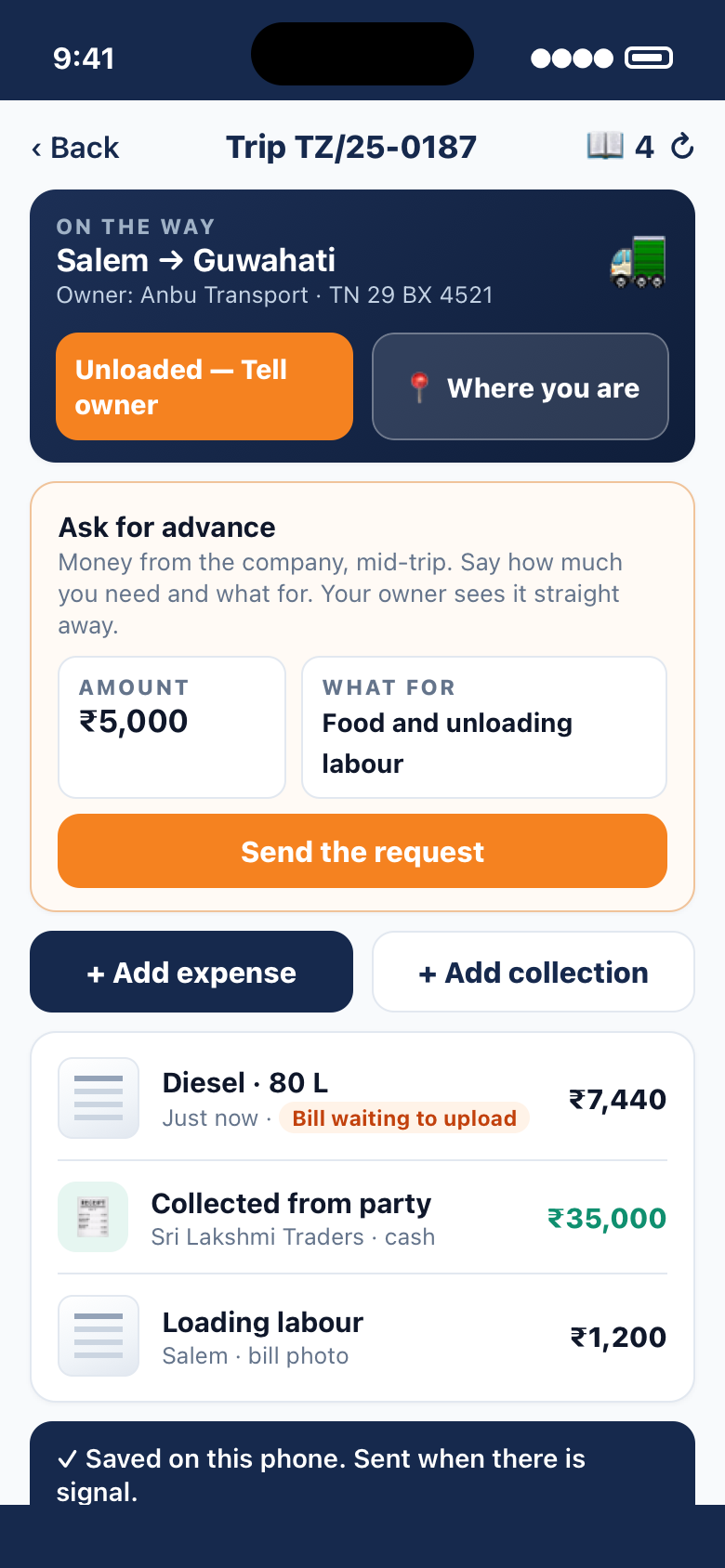
  3. He asks for an advance in the middle of the trip Driver How much and what for. You see it straight away with where he stands today, and send the amount — or say not now. No phone call, no guessing what he already holds.
  4. Unloaded — he tells you, with the location Driver One tap sends the unloading, the odometer and where the lorry is standing. If the next load is arranged, he can start the forwarding trip himself; you are told at once and nothing counts until you agree it.
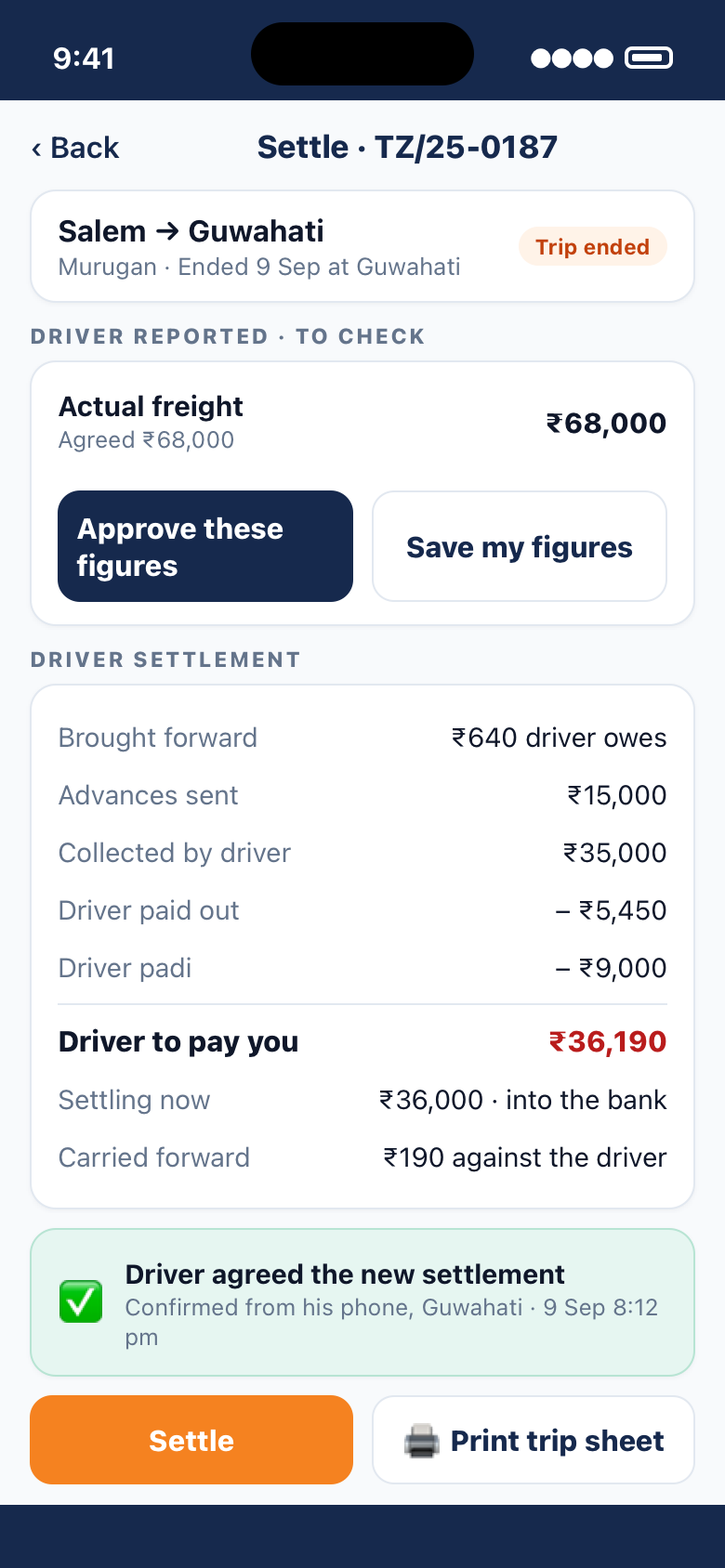
  5. He reports the actual figures, you approve them Owner What the freight, loading, unloading and tonnage actually came to. Approve them as they are or save your own — the driver sees what you changed.
  6. Settle while the lorry is still out of town Owner End the trip from wherever you are. The settlement is worked out from the same entries: advances, collections, what he paid out, his padi, anything brought forward. Settle it now, or end the trip and settle when the freight is agreed.
  7. He agrees — and gets paid on time Driver The driver confirms the settlement from his phone, in Guwahati or wherever he is. What is left carries forward to his next trip, and the signed trip sheet prints when he is home.
The driver's phone: Unloaded — tell owner, Ask for advance with amount and reason, Add expense and Add collection, and a bill waiting to upload
TrukZone DriverAsk for an advance, record a bill, tell the owner
The owner's settlement screen: the driver's reported figures to approve, brought forward, advances, collections, driver to pay you, carried forward, and the driver's agreement
TrukZone FleetApprove his figures, settle, print the sheet
🏁
Trip accounting closes in Guwahati, not when the lorry gets back to Salem.

Because the bills, the collections and the driver's figures reach you over the phone, a trip can be ended, checked and settled while the driver is 2,000 km away — and he is paid for it before the next load, not after the lorry comes home three weeks later.

Out of town is not out of reach

Know where it is, book its next load, get it fixed.

The owner app and the driver app share a map, a load board and a workshop list — so a lorry standing in Vijayawada is as easy to look after as one in your own yard.

Location without a tracker

One map for the fleet — GPS box or driver's phone.

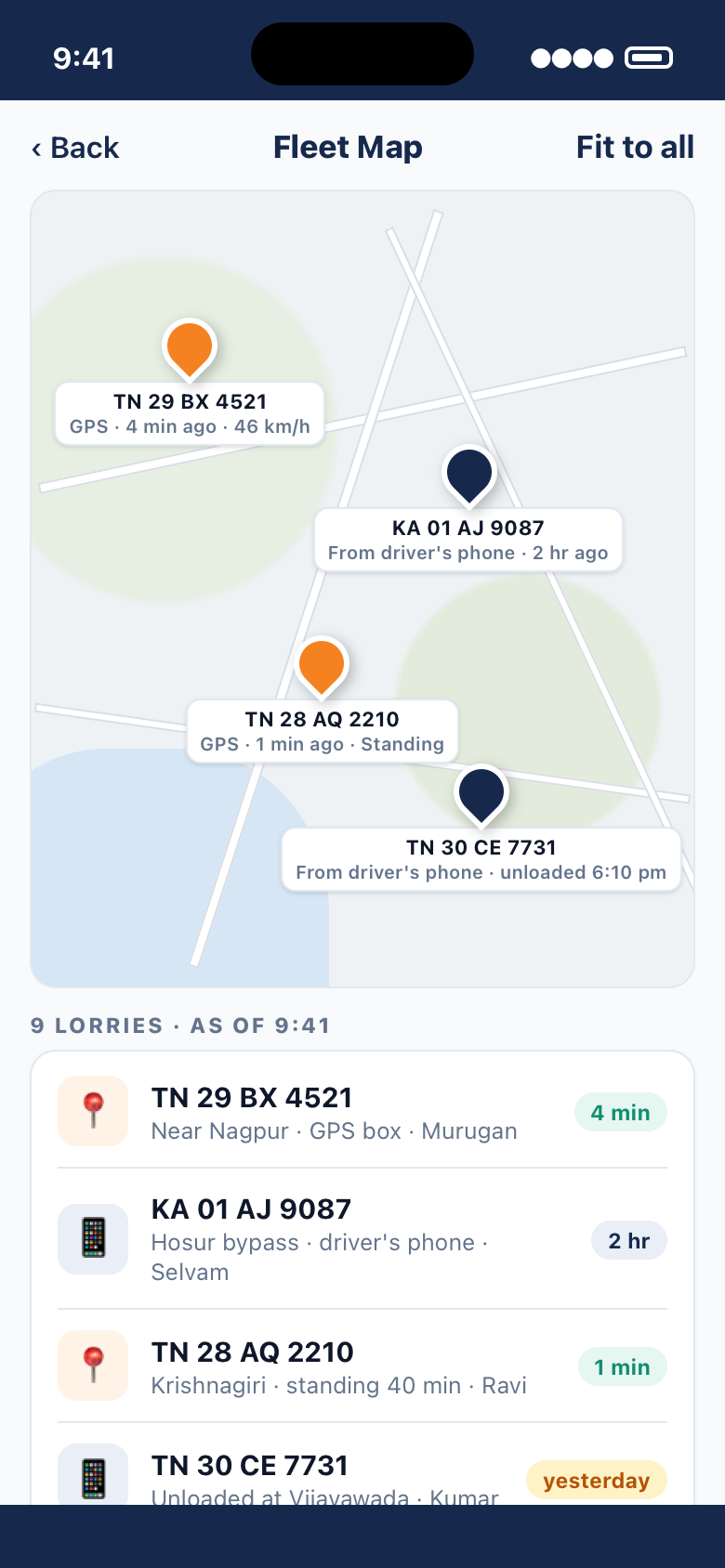
Not every lorry has a GPS box, and the ones that do are not all from the same company. The fleet map does not mind. Lorries with a tracker report on their own; the rest are placed from the driver's handset when he shares his position or tells you he has unloaded.

  • 📍Each pin says how it was placed and when — “GPS · 4 min ago” or “From driver's phone · 2 hr ago”
  • 🔌Connect the GPS account you already pay for — Traccar-based or any other — with your login or the link they sent you. Every lorry on it comes across in one go.
  • 🛣️Where it went: distance run, running and standing time, top speed and every stop, for today, yesterday or any dates you pick
  • 🙈Never background tracking of the man — a driver's position is what his lorry reports or what he chooses to share
Fleet map with four lorries: two placed by GPS box, two from the driver's phone, each with the time it was last heard from
The next load, before the lorry is empty

Book a load for the lorry that is out-station.

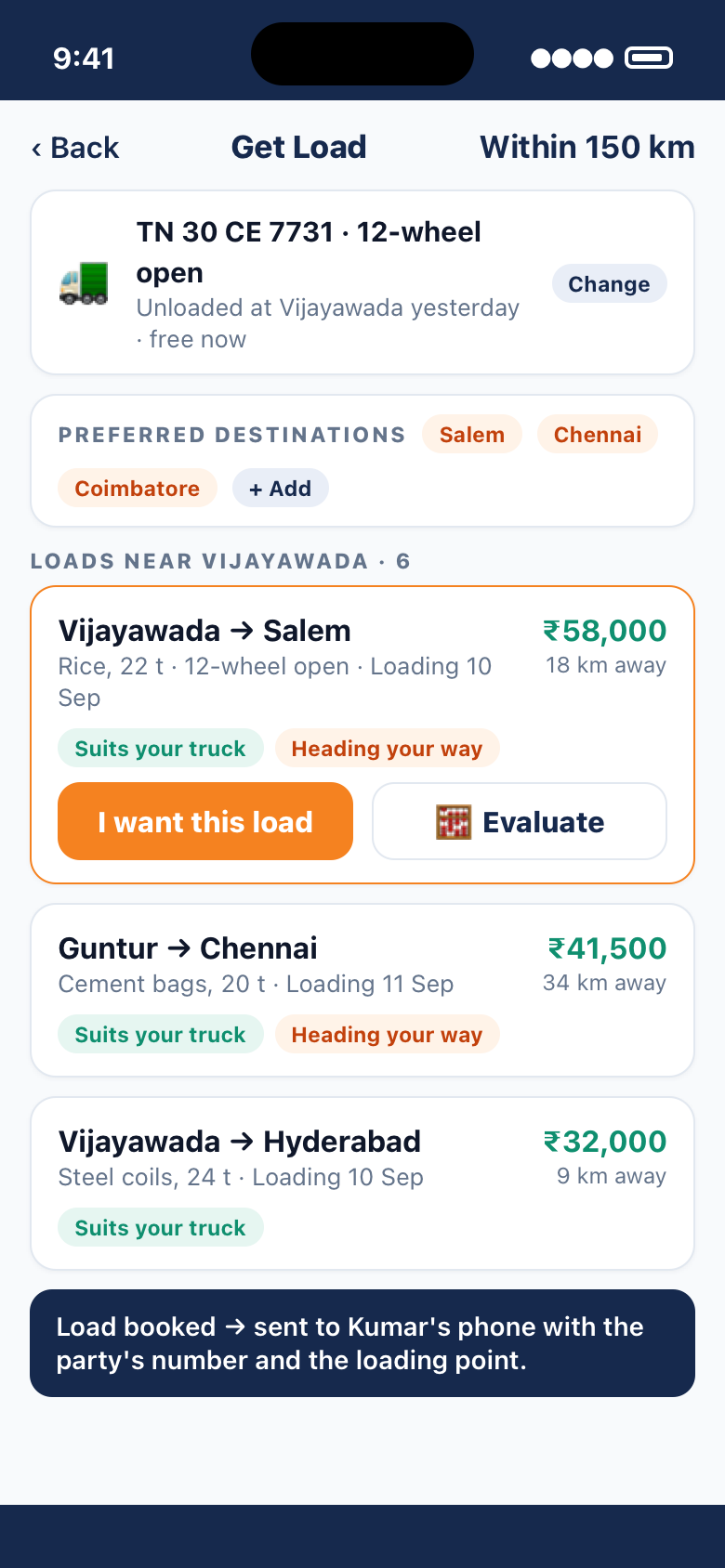
Your lorry has just unloaded at Vijayawada. Open Get Load with that lorry at the top, and the board shows the loads near it, not near you — filtered to what its body type can take, with the ones heading back your way marked.

  • 📦Say the lorry's preferred destinations and the booking offices can find you a load going that way
  • 🧮Evaluate a load before you take it — diesel at today's rate, tolls, driver padi — and see what is really left
  • 📲Booked, it lands on the driver's phone as an allotted load with the party's number and the loading point, and becomes the next trip in your LR book
  • 🏢Mark a lorry available and say where it will be free, so the offices near there see it
The load board opened for a lorry that has just unloaded at Vijayawada, showing loads near it that suit the truck and head back towards Salem
When it stops where nobody knows anybody

Mechanic support, wherever the lorry breaks down.

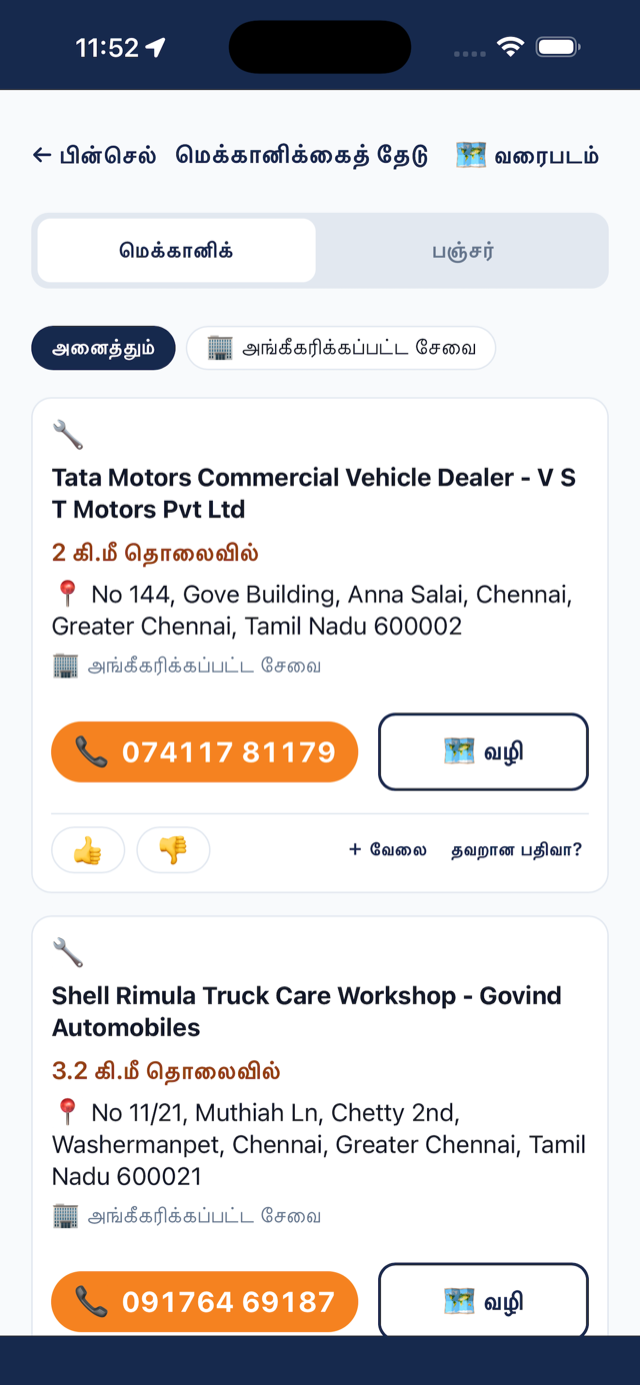
The workshop and puncture-shop list that drivers have been building in TrukZone Driver — ranked by distance from the lorry, with what each one can do, who recommends it and a button to call — is in the owner app too. So when a driver rings from a ghat section at night, you can see what is near him before he does.

  • 🔧Mechanics and puncture shops nearest to where the lorry is standing, with distance and a call button
  • 🙋Nothing nearby? Ask for help in the Community Zone — a driver on that road usually knows one
  • 🧾The repair goes on the trip or on the lorry's fleet record, with the bill, so the cost is in the books and the breakdown is in the history
Nearby mechanics listed in Tamil with distance, address and call buttons
Fleet management & reminders

Nothing on a lorry falls due — or goes missing — without you hearing about it first.

Insurance lapses on a Tuesday, the FC runs out at a check post, the EMI bounces because the lorry was in Kolkata. Fleet management keeps one list of everything that falls due on every lorry — and warns you, and the driver, ahead of the date. And the checklist keeps track of what is in the truck and what has to be checked, trip by trip.

Everything with a date, on one list.

Add each thing once against the lorry it belongs to. Every kind has its own shape — an EMI is one figure every month; an oil service is several payments as they come in; a breakdown is a one-off with a bill.

InsuranceFC (fitness certificate)National permit taxState taxEMIOil serviceWheel alignmentServiceBreakdownAnything else you name
  • ⏰Warn before — 30 days for a permit, 7 for a service, whatever suits. It shows in “Due now”, on the dashboard's “Coming up”, and as a reminder on your phone.
  • 🔁Repeats every month, quarter, year or N days. Mark this one done and the next one is created, counted from this one's date — not from today, so you never drift.
  • 👨‍✈️The driver is warned at the same time. He sees “Coming up on this lorry” in his app, and can tap Ask office when the date is close and nothing has happened — which shows on your list as “Your driver asked about this”.
  • 💸Pay and close. Marking it done records the payment — to the cash book, or to the bank account it left — and it shows up in the lorry's costs and in the profit report. No second entry anywhere.
  • 📄Papers expire too. Insurance, permit, fitness and pollution certificates photographed on the lorry carry their validity, and “expiring” appears on the truck before the date — for you and for whoever drives it.
Fleet management on the phone: insurance three days overdue, FC due today, permit tax in six days, an EMI the driver asked about, and the insurance's detail with Pay and close
1Add it once

“Insurance, TN 29 BX 4521, due 5 Sep, ₹42,300, every year, warn 30 days before.”

2Get warned ahead

From 6 Aug it is on Due now and on the dashboard. The driver on that lorry sees it too.

3Pay and close

Mark it done with the amount. The payment lands in the cash book or the bank, dated and headed.

4Next one is ready

5 Sep next year is already on the list, warning from 6 Aug. The history keeps what was paid, when, and by whom.

Vehicle checklists

Know what is in the truck, and that it is looked after on time.

A lorry leaves the yard with a jack, a stepney, two tarpaulins, a fire extinguisher and a tool kit — and comes back three weeks later with whatever is left. The checklist is the list of what should be in the truck and what has to be checked, and how often; the driver answers it on his phone, and you see what he said.

  • 🧰In the truck. The things a driver signs for when he takes the lorry — start from the standard list of jack, stepney, tarpaulin, ropes, fire extinguisher, first-aid box, RC book, FASTag — and change whatever does not suit this truck. Present, missing or damaged, with a note and a photo.
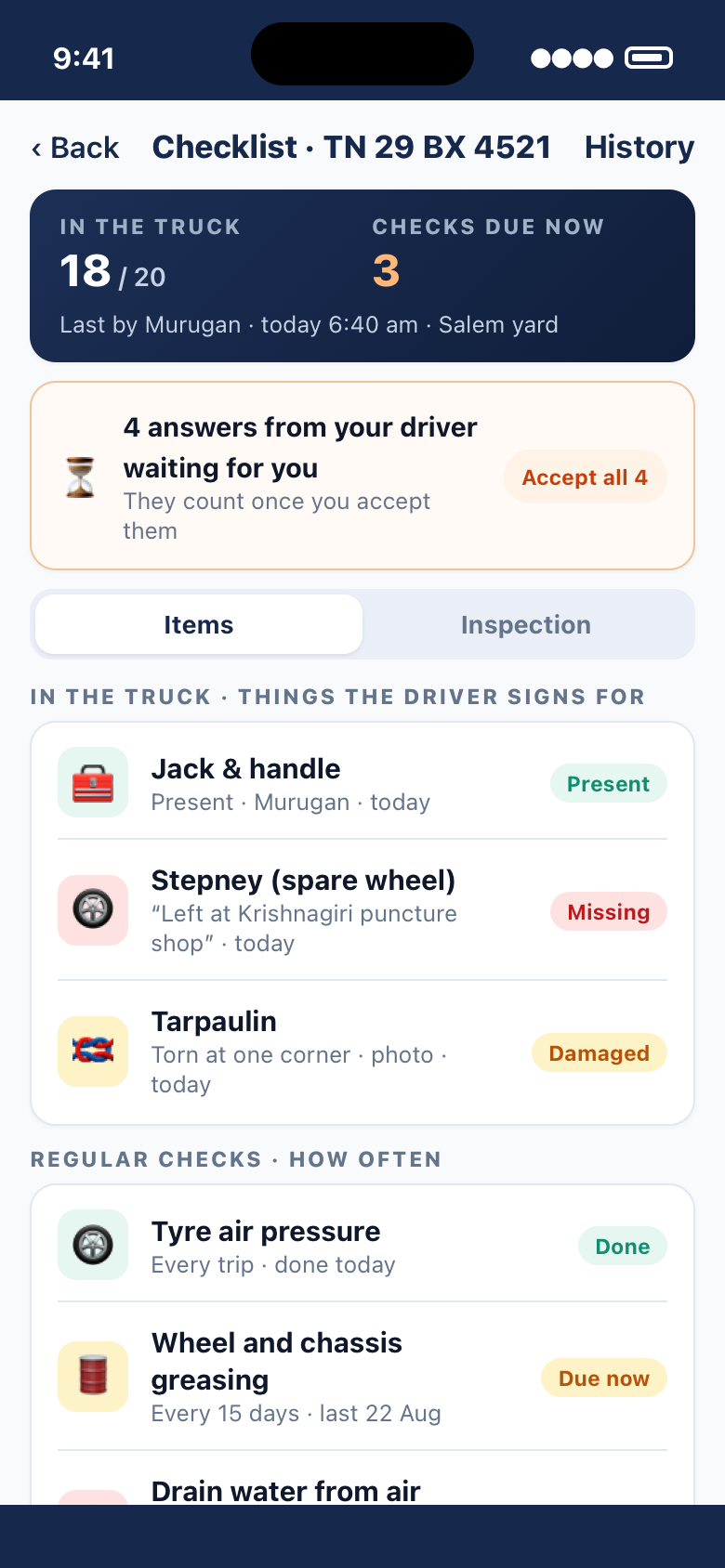
  • 🔁Regular checks. Tyre pressure every trip; drain the air tanks every day; wheel nuts every week; greasing every 15 days; oil and coolant every month. Each item has its own interval, and “3 checks due” shows on the truck, on the trip and on your phone until they are done.
  • 📲The driver answers, you approve. His answers go to your fleet office for review — accept all, or send one back. Anything missing or damaged reaches you the same day, not when the lorry is home. He can mark the rest “as the last driver left them” and answer only what changed.
  • 📚One list, or one per truck. Set the list for all trucks, for a body type, or for one particular lorry. Every answer ever given about a truck is in its history — by item, by driver, by date — so a stepney that keeps going missing is a pattern you can see.
A truck's checklist on the owner's phone: 18 of 20 items in the truck, 3 checks due, the driver's answers waiting for approval, a missing stepney and a damaged tarpaulin, and regular checks with their intervals
📄

Papers that expire

Insurance, permit, fitness and pollution certificates photographed on the lorry carry their validity. “Expiring” appears on the truck before the date — for you, and for whoever drives it — and the renewed copy files next to the old one.

🔔

Reminders that reach the right person

Owner and driver are warned together, so the driver does not arrive at the check post with a paper you both thought the other had renewed. A lorry due for service shows it on the map pin and on the trip.

For your drivers · free · out now

What your drivers get in TrukZone Driver.

The owner app is only half the picture. Your drivers carry the other half — and it costs them nothing.

📄

Papers on the phone

Licence, RC, insurance, permit, fitness — photographed once, ready at any check post with or without signal. Papers you file for the lorry reach every driver you put on it.

📋

The trip, as you see it

Expenses with bill photos, collections, diesel by the litre, advances asked and received, the running balance — and the settlement, which he agrees to on his own phone.

📦

Loads that fit the lorry

The loads near him that his lorry can take, the ones you book for him with the party's number attached, and a calculator to see what a load is really worth.

💬

Community Zone

Your own fleet's group plus the route, town and lorry-type groups — a blocked road, a check post, a parking spot, a message from the office, sent once and everyone on the road for you has it.

🔧

Mechanics and help on the road

The nearest workshops and puncture shops with a call button, and quick help from the drivers around him when there is nothing on the list.

🗣️

In his own language

Tamil, Hindi, Telugu, Kannada, Malayalam, Marathi, Bengali, Punjabi or English — the whole app, not just the menu.

In the language you speak

Every screen, every button and every warning — on the phone, the tablet and the desk. Not just the menus.

  • English
  • हिन्दी
  • தமிழ்
  • తెలుగు
  • ಕನ್ನಡ
  • മലയാളം
  • मराठी
  • বাংলা
  • ਪੰਜਾਬੀ
Free and Premium

Free on the phone. Premium for the office.

The handset app is free for a small fleet. Premium adds the tablet and desk layouts, staff logins, live trip location, the cash book and profit & loss — priced by how many lorries you run.

📱

Free

Your lorries, your drivers and their papers, Get Load and the trip calculator — on your phone, for a small fleet.

⭐

Premium

Trips, ledgers, the fleet map, the tablet and desk (Mac & Windows) layouts, staff users with their own logins, live location and no daily limits.

Yearly plans, with a GST invoice. The price for your fleet is shown in the app and at checkout, or ask us. Buy here or in the app — Premium is on your phone, tablet and computer as soon as it is bought.

Questions owners ask

Before you ask

Can I settle a trip while the driver is still out of town?

Yes. The driver's expenses, bill photos, collections and his reported figures reach you over the phone, so you can end the trip, approve his figures and settle it while he is 2,000 km away. He agrees the settlement from his own phone, and whatever is left carries forward to his next trip.

Does every lorry need a GPS box to show on the map?

No. Lorries with a GPS box report on their own; the rest are placed from the driver's handset when he shares his position or tells you he has unloaded. Each pin says how it was placed and when. If you already pay a GPS company, connect that account and every lorry on it comes across.

Can I use it on a computer, and can my office staff use it?

Yes. TrukZone Fleet is a real desktop application on Mac and Windows, linked from your phone with a code or a QR — no password, nothing by SMS. Office users get their own user name and password and see only the screens you allow, as “see” or “change”.

Do my drivers need an app?

Yes — TrukZone Driver, which is free for drivers and out now on Google Play and the App Store. The trip is the same screen in both apps. Adding a driver to your fleet takes his agreement as well as yours.

What reminders does fleet management give?

Insurance, FC, national permit tax, state tax, EMI, oil service, wheel alignment, service, breakdowns and anything else you name — per lorry, with a warn-before period and a repeat interval. You and the driver on that lorry are warned together. Marking one done records the payment into the cash book or bank and creates the next one.

Which languages does it come in?

English, Hindi, Tamil, Telugu, Kannada, Malayalam, Marathi, Bengali and Punjabi — every screen, button and warning, on phone, tablet and desktop.

What does it cost?

TrukZone Driver is free for drivers. TrukZone Fleet is free on the phone for a small fleet; Premium is priced by how many lorries you run and comes with a free trial — see Free and Premium above for what each plan includes. The price for your fleet is shown in the app and at checkout.

Talk to us

Ask us anything

The price for your fleet, a demo on your own lorries, or help setting it up — leave your number and we will call you back.

  • 📞A call back from our team on the number you give.
  • 🚛Tell us how many lorries you run and we will tell you what Premium costs for them.
  • ✉️Or write to support@trukzone.in.

We use these details only to answer you.

Your books are yours

What you pay a driver and what a party owes you is nobody else's business. TrukZone Fleet is built the same way the driver app is — the phone in your pocket is where your working copy lives, and nothing is shown to anyone you have not shown it to.

Read the privacy policy →

  • ✓Your fleet, your trips and your ledgers open on the handset, without waiting for a signal.
  • ✓Chats are kept on your phone, not on our server.
  • ✓A driver's position is what his lorry reports or what he chooses to share — never background tracking of the man.
  • ✓A linked computer can be signed out from your phone in one tap; an office user can be switched off in one tap.
  • ✓Adding a driver takes his agreement as well as yours. A settlement takes his agreement too.
  • ✓You can ask for your data to be deleted at any time.
Out now on Google Play

Get TrukZone Fleet

Free on your Android phone for a small fleet. Sign in with your mobile number — no email, no password — and if you drive as well as own, TrukZone Driver is ready for you too.

On an iPhone, iPad, Mac or Windows? Those are on the way — tell me when it is out. Share the app with another owner: trukzone.in/getfleet